Outcome
Success rate in first-time usability test. Supports advanced logic, yet simple.
80%
Reduced steps from 3 to 1, saving time & reducing merchant drop-offs.
3 to 1
New merchants onboarded - bringing the total number of partners to 33.
2

Turning complexity into clarity
Redesigning BoxPay’s payment routing to match real-world merchants needs.
Outcome
Outcome
Success rate in first-time usability test. Supports advanced logic, yet simple.
80%
Reduced steps from 3 to 1, saving time & reducing merchant drop-offs.
3 to 1
New merchants onboarded - bringing the total number pf partners to 33.
2
Outcome
Success rate in first-time usability test. Supports advanced logic, yet simple.
80%
Reduced steps from 3 to 1, saving time & reducing merchant drop-offs.
3 to 1
New merchants onboarded - bringing the total number pf partners to 33.
2
Team
Product Designer (Me)
2 Product Managers
Chief Product Officer
Chief Technology Officer
1 Frontend Developer
1 SDE
1 QA Tester
My Role
Product Designer ––– Product Architecture, Interaction Design, User Flow, Visual Design,
Prototyping
Duration
3 months (Sep 24 to Nov 24)
Overview
BoxPay Technologies is a payment orchestration platform tailored for e-commerce merchants. The platform enables businesses to manage global payments seamlessly and securely through a single interface, addressing the need for expanded reach and optimised transaction processing.
BoxPay proudly highlights its 3Rs in every sales pitch:
• Reach
• Routing
• Reconciliation
Routing or Payment Routing is the process of directing a payment transaction through the most efficient or cost-effective path between the payer and the recipient. It involves selecting the best payment network, gateway or processor based on factors like transaction fees, currency, exchange rates, processing speed and success rate.
BoxPay Technologies is a payment orchestration platform tailored for e-commerce merchants. The platform enables businesses to manage global payments seamlessly and securely through a single interface, addressing the need for expanded reach and optimised transaction processing.
BoxPay proudly highlights its 3Rs in every sales pitch:
• Reach
• Routing
• Reconciliation
Routing or Payment Routing is the process of directing a payment transaction through the most efficient or cost-effective path between the payer and the recipient. It involves selecting the best payment network, gateway or processor based on factors like transaction fees, currency, exchange rates, processing speed and success rate.
Turning complexity into clarity
Turning complexity into clarity
Turning complexity into clarity
Redesigning BoxPay’s payment routing to match real-world merchants needs.

BoxPay’s routing feature has been live since its inception. However, the original design was basic, only to meet functional needs. With merchants expanding globally with multiple gateways, the limitations started creating friction in operations and revenue optimisation. As BoxPay kept scaling, the need for a smarter, more flexible payment routing system became urgent.
The Ask
I was assigned to revamp this feature, not just visually but functionally. The goal was clear: empower merchants with full control to define routing logic that matches their growing and diverse business requirements.
BoxPay’s routing feature has been live since its inception. However, the original design was basic, only to meet functional needs. With merchants expanding globally with multiple gateways, the limitations started creating friction in operations and revenue optimisation. As BoxPay kept scaling, the need for a smarter, more flexible payment routing system became urgent.
The Ask
I was assigned to revamp this feature, not just visually but functionally. The goal was clear: empower merchants with full control to define routing logic that matches their growing and diverse business requirements.
How it All Began: A Tale of Flipping the Existing Design for Better Control - Flip the card 👇🏻
Card HDFC
Help
Reset Rule
Confirm & Review
Business Unit*
BoxPay Delhi
For
Route to
Add Processor
And
Add More Conditions
Card Type
INCLUDES
Credit, Debit
Card Network
INCLUDES
HDFC
New & Improved Design – design which helped onboard 2 new merchants
Back to old design
Rule Configuration
Please ensure you select at least one of the following: countries, currencies, or payment categories
Rule Input
Select business unit
Business Unit*
Select countries
Countries*
Select currencies
Currencies*
Select categories
Payment Categories*
Rule Output
Select processor
Processor*
Select percentage
Percentage*
Existing Design – design which needed an upgrade
Flip to new design
New & Improved Design – design which helped onboard 2 new merchants
Back to old design
Card HDFC
Help
Reset Rule
Confirm & Review
Business Unit*
BoxPay Delhi
For
Route to
Add Processor
And
Add More Conditions
Card Type
INCLUDES
Credit, Debit
Card Network
INCLUDES
HDFC
Rule Configuration
Please ensure you select at least one of the following: countries, currencies, or payment categories
Rule Input
Select business unit
Business Unit*
Select countries
Countries*
Select currencies
Currencies*
Select categories
Payment Categories*
Rule Output
Select processor
Processor*
Select percentage
Percentage*
Existing Design – design which needed an upgrade
Flip to new design
Test
Routing
Rule Input
Select business unit
Business Unit*
Select countries
Countries*
Select currencies
Currencies*
Select categories
Payment Categories*
Rule Output
Select processor
Processor*
Select percentage
Percentage*
%
Select processor
Processor*
Select percentage
Percentage*
%
Save Rule
Cancel
Select All
UPI
Cards
Wallets
EMI
Home
Configurations
Order Management
Routing Rules
Payment Links
Analytics
Developers
Recon
API Docs
Settings
Support
Rule Configuration
Please ensure you select at least one of the following: countries, currencies, or payment categories
Fig. 1.3. Website view of the old routing feature (live until 2024)
UNDERSTAND
DISCOVER
DESIGN
DELIVER
Read &
understand
the brief
Redefining
PRD
Checking the
existing
design
Curiosity Phase
Research Phase
Synthesis & Ideation Phase
Implementation Phase
Competitor
Analysis
Sketching & Ideating to match expectations
Evaluating 1st ideas
Prototype, Test &
Analyse
Learn, Iterate & Repeat
Develop, test & Iterate
Release & Out
Finalizing the design and ensuring it scales well
Noting insights &
reworking
Finding
opportunities
Finding
opportunities
Noting insights &
reworking
Fig. 1.1. Double Diamond? We Broke Up…It’s complicated!
Understanding the Foundation - What Was There, What Was Missing & What Was Needed
I started by reviewing the PRD and the live routing feature, which only supported four broad conditions: Business Unit, Country, Currency, Payment Method. The gap: a merchant couldn't route 'credit cards issued by HDFC specifically,' only 'cards' generally. That granularity gap was the core problem to solve.
Understanding the Foundation - What Was There, What Was Missing & What Was Needed
I started by reviewing the PRD and the live routing feature, which only supported four broad conditions: Business Unit, Country, Currency, Payment Method. The gap: a merchant couldn't route 'credit cards issued by HDFC specifically,' only 'cards' generally. That granularity gap was the core problem to solve.
UNDERSTAND
DISCOVER
DESIGN
DELIVER
Read &
understand
the brief
Redefining
PRD
Checking the
existing
design
Curiosity Phase
Research Phase
Synthesis & Ideation Phase
Implementation Phase
Competitor
Analysis
Sketching & Ideating to match expectations
Evaluating 1st ideas
Prototype, Test &
Analyse
Learn, Iterate & Repeat
Develop, test & Iterate
Release & Out
Finalizing the design and ensuring it scales well
Noting insights &
reworking
Finding
opportunities
Finding
opportunities
Noting insights &
reworking
Fig. 1.1. Double Diamond? We Broke Up…It’s complicated!
Rule Input
Select business unit
Business Unit*
Select countries
Countries*
Select currencies
Currencies*
Select categories
Payment Categories*
Fig. 1.2. Old design which only allowed merchants to define rules using 4 inputs.
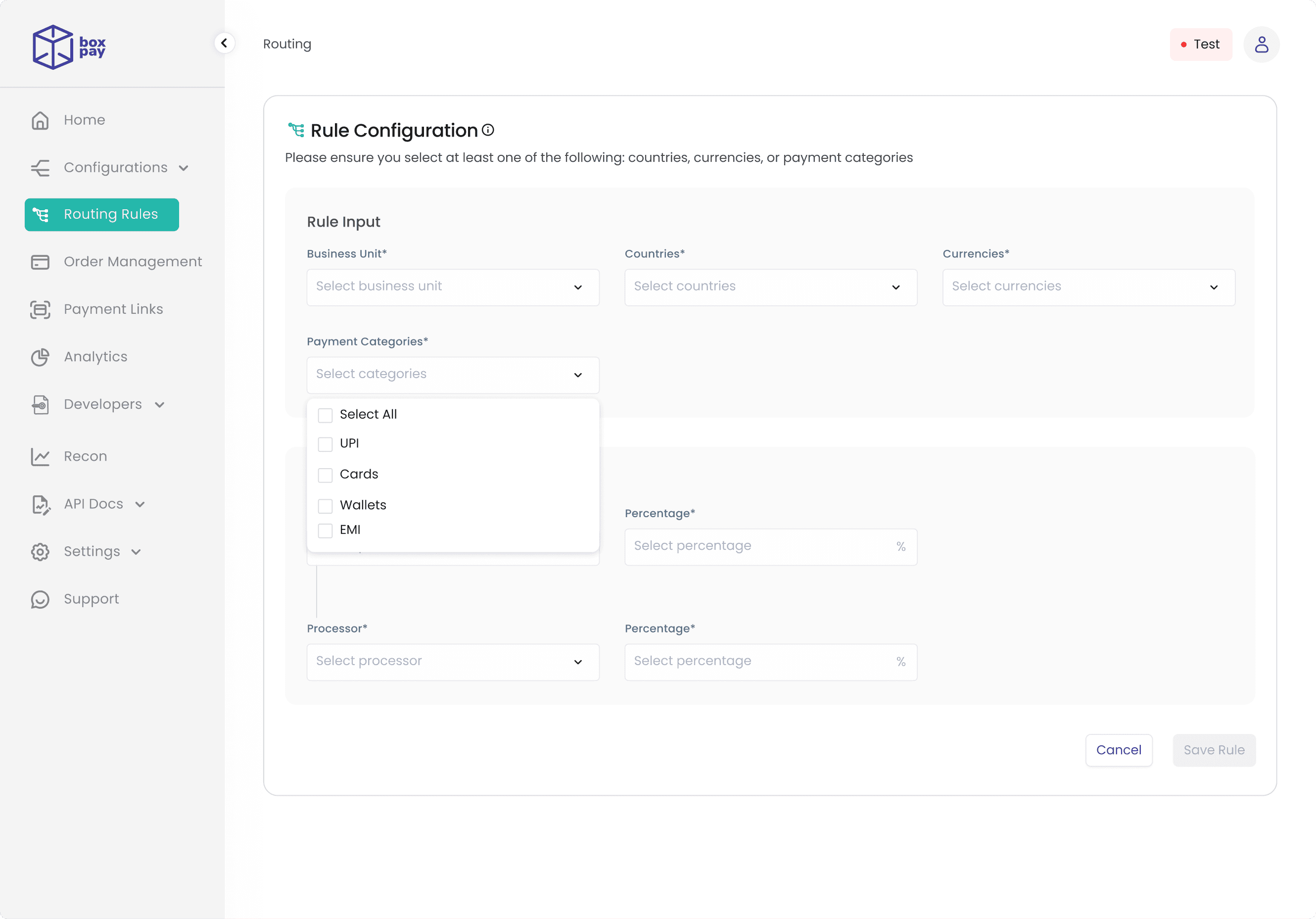
Fig. 1.3. Website view of the old routing feature (live until 2024)
I Wanted a Framework; It Wanted Freedom
Rule Input
Select business unit
Business Unit*
Select countries
Countries*
Select currencies
Currencies*
Select categories
Payment Categories*
Fig. 1.2. Old design which only allowed merchants to define rules using 4 inputs.
Rule Input
Select business unit
Business Unit*
Select countries
Countries*
Select currencies
Currencies*
Select categories
Payment Categories*
Fig. 1.2. Old design which only allowed merchants to define rules using 4 inputs.
Fig. 1.3. Website view of the old routing feature (live until 2024)
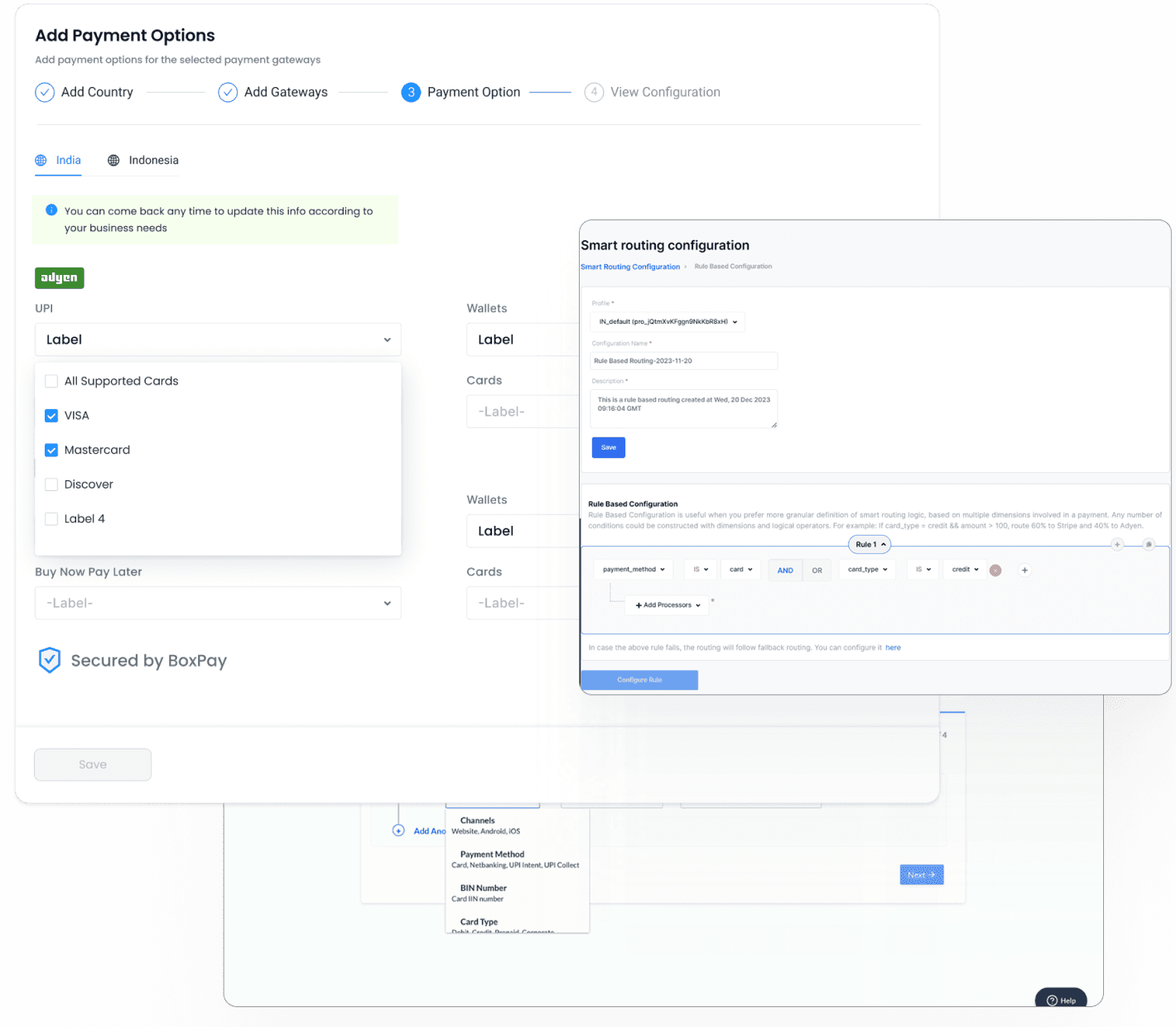
Fig. 2. How competitors do it.
I studied competitor platforms with similar rule-based routing. All followed the same three-step pattern (name rule, add logic, review separately), and all were built for technically savvy users rather than everyday merchants.
I studied competitor platforms with similar rule-based routing. All followed the same three-step pattern (name rule, add logic, review separately), and all were built for technically savvy users rather than everyday merchants.
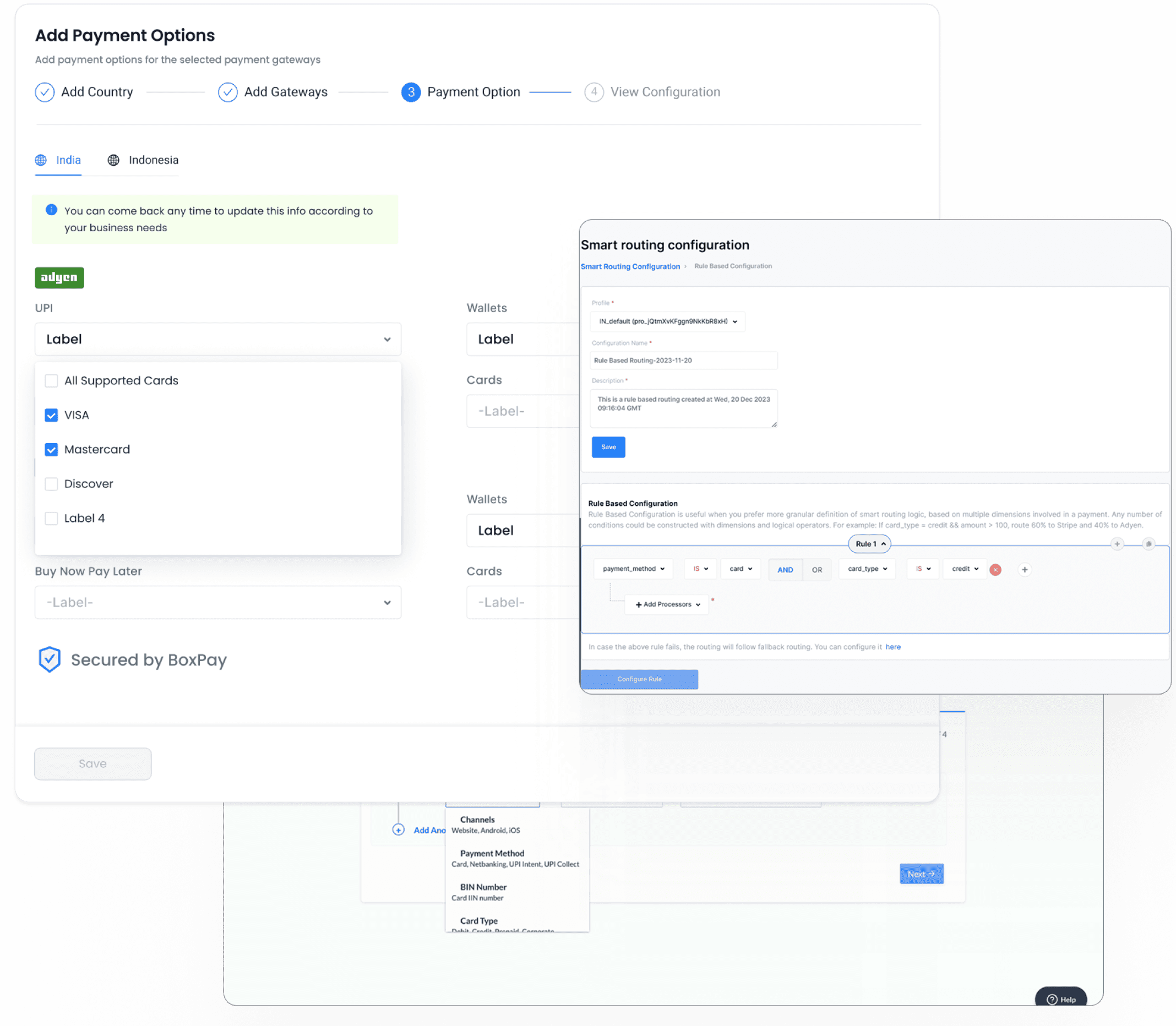
Fig. 2. How competitors do it.
Fig. 2. How competitors do it.
Competitor’s Design Stalking (Professionally, of course)
Refining Through Iteration
Incorporating the suggestions, I refined the design to create this improved version.
Designing the core: ‘Rule Workspace’
Once everyone in the team was aligned with this intention, I focused first on the heart of the feature, the Rule Builder Workspace. This is where merchants define the logic and assign gateways.
Once everyone in the team was aligned with this intention, I focused first on the heart of the feature, the Rule Builder Workspace. This is where merchants define the logic and assign gateways.
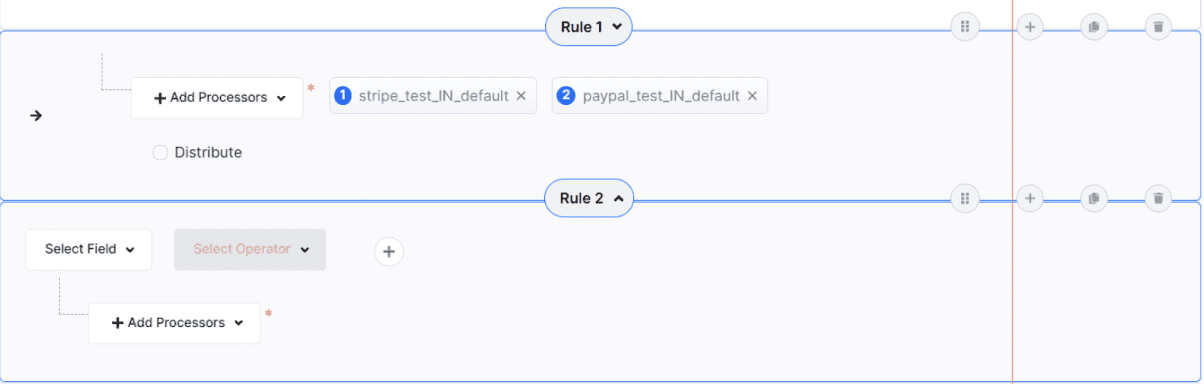
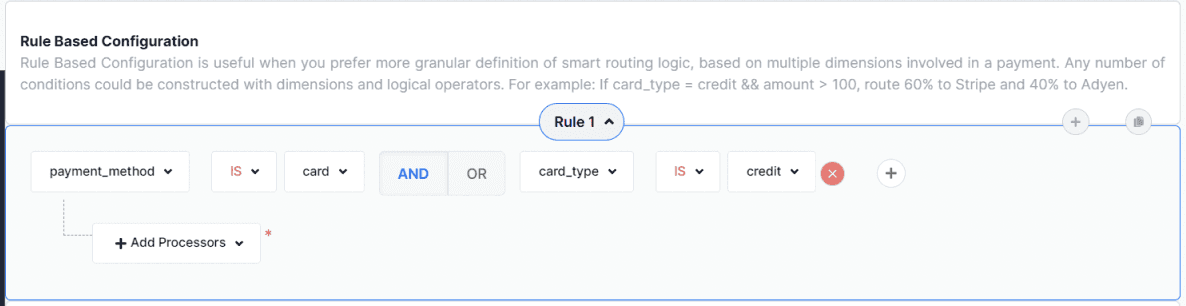
Fig. 3.1. Complexity in existing competitor flows
One thing I was certain of - complexity shouldn’t come at the cost of usability. Not every merchant has the luxury of a dedicated, tech-savvy team. Many are small-scale, less equipped, and unfamiliar with navigating advanced systems. A good design should empower them too. After all, not every interface needs to feel like flying a plane.
One thing I was certain of, complexity shouldn’t come at the cost of usability. Not every merchant has the luxury of a dedicated, tech-savvy team. Many are small-scale, less equipped, and unfamiliar with navigating advanced systems. A good design should empower them too. After all, not every interface needs to feel like flying a plane.
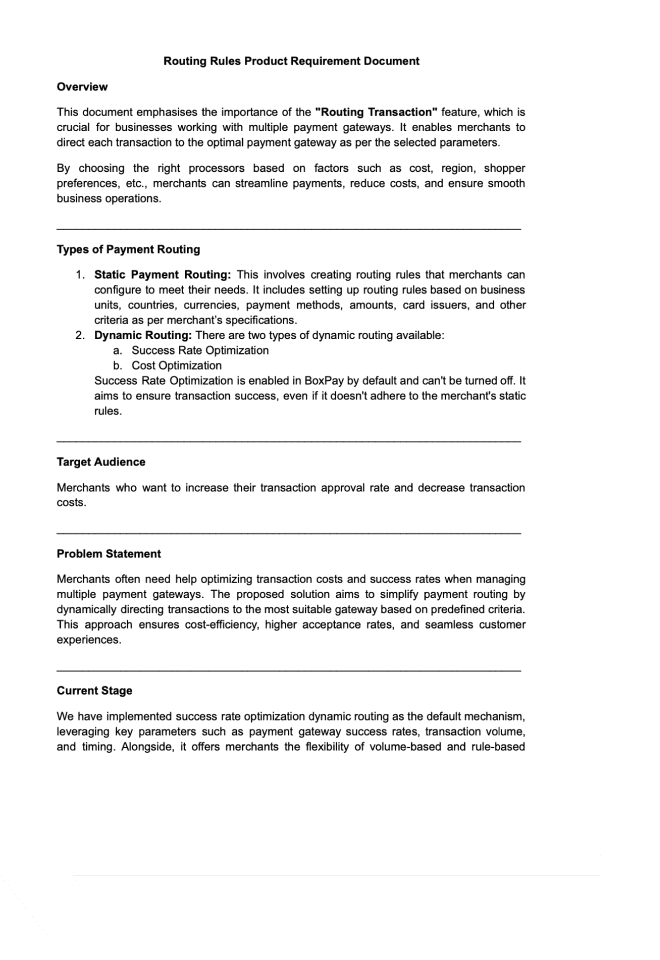
Fig. 3.2. Project Requirement Document
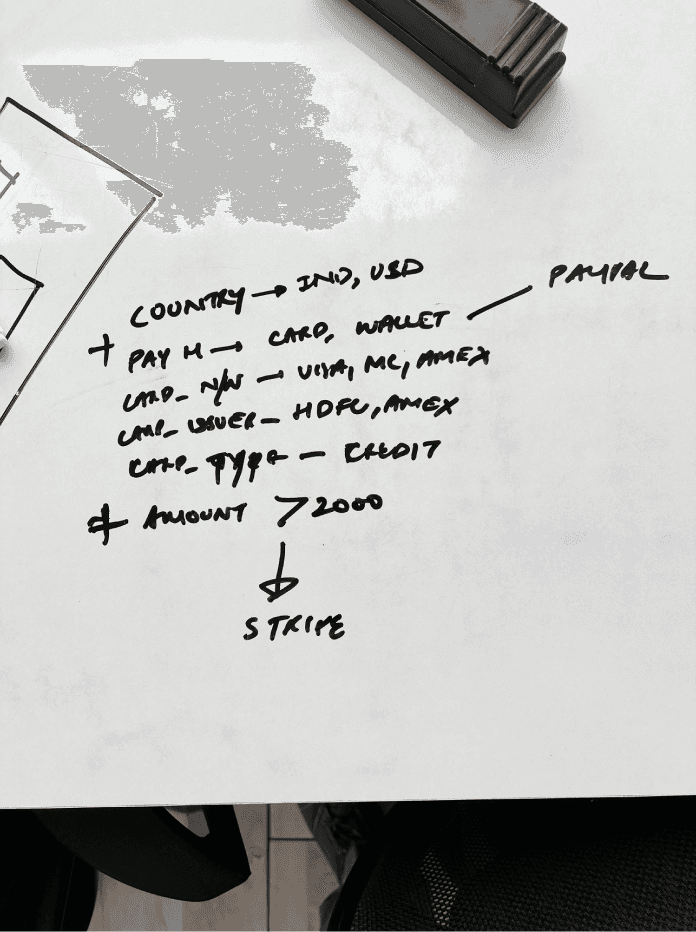
Fig. 3.3. Tackling complex use cases first
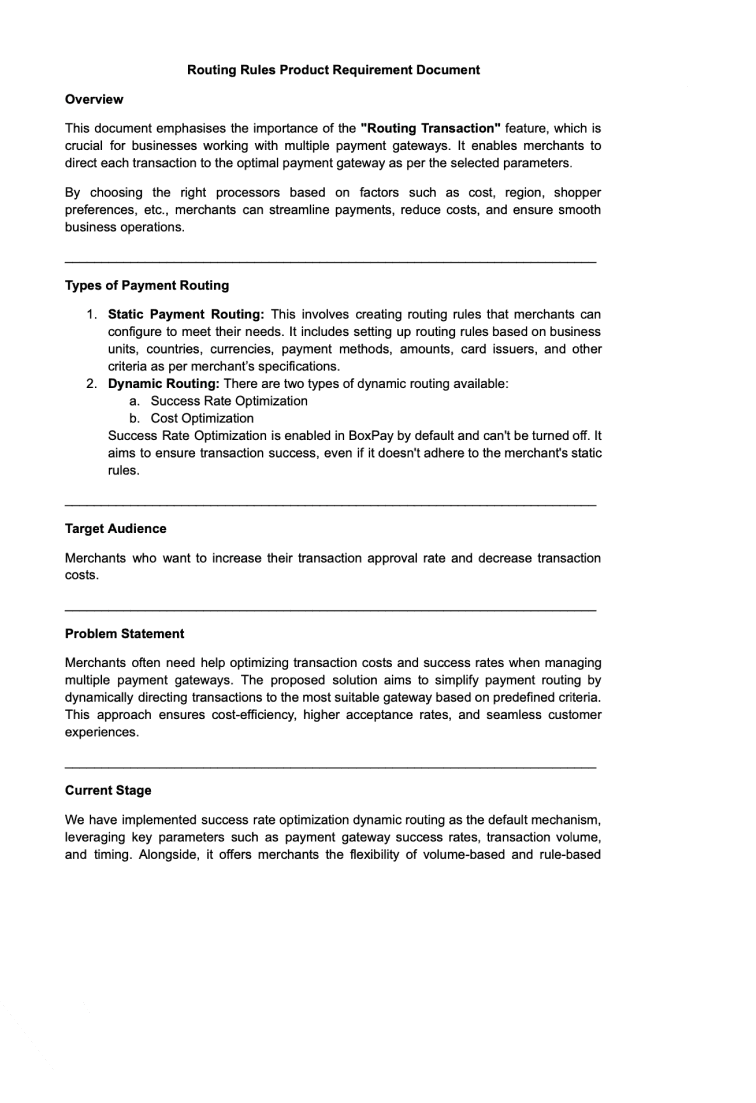
Fig. 3.2. Project Requirement Document
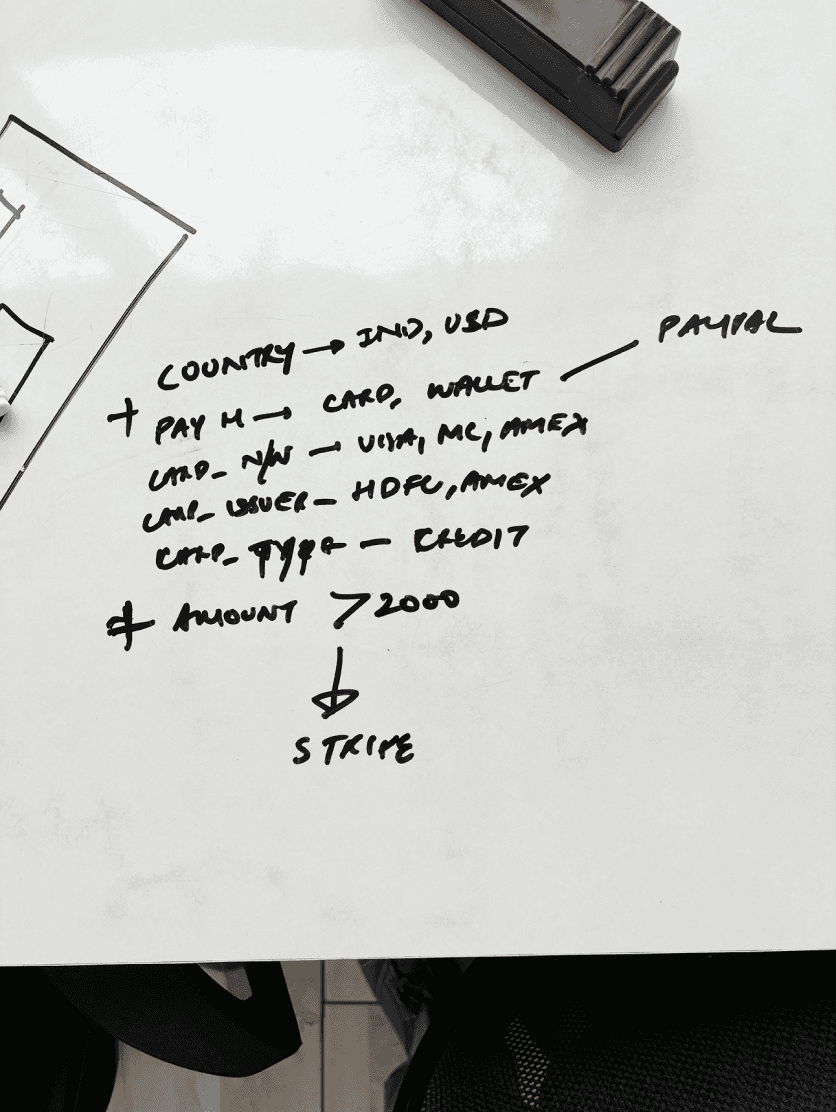
Fig. 3.3. Tackling complex use cases first
Before sketching anything, I aligned with the Product Manager to clarify ambiguous use cases and remove assumptions. We revisited the PRD and made some changes.
I initially set out to make the feature stand out. However, I took a detour by tackling the most complex use case first (as shown in Fig. 3.3), a move that quickly derailed our timeline. With the PM’s help, we shifted gears to address simpler needs first, then scaled up to handle more complex ones.
Following this approach, I shared some early versions with:
🧩 Product Manager, to validate logic handling and confirm the look of the design
🖥 Frontend developers, to check the feasibility of these designs
📝 Chief Product Officer (CPO) and other stakeholders, to match their expectations
Before sketching anything, I aligned with the Product Manager to clarify ambiguous use cases and remove assumptions. We revisited the PRD and made some changes.
I initially set out to make the feature stand out. But I took a detour by tackling the most complex use case first ( as shown in Fig.3.3.), a move that quickly derailed our timeline. With the PM’s help, we shifted gears to solve simpler needs first, then scaled up to handle complexity.
Following this approach, I shared some early versions with:
🧩 Product Manager, to validate logic handling and confirm the look of the design
🖥 Frontend developers, to check for the feasibility of these designs
📝 Chief Product Officer (CPO) and other stakeholders, to match with their expectations
Before sketching anything, I aligned with the Product Manager to clarify ambiguous use cases and remove assumptions. We revisited the PRD and made some changes.
I initially set out to make the feature stand out. But I took a detour by tackling the most complex use case first ( as shown in Fig.3.3.) – a move that quickly derailed our timeline. With the PM’s help, we shifted gears to solve simpler needs first, then scaled up to handle complexity.
Following this approach, I shared some early versions with:
🧩 Product Manager, to validate logic handling and confirm the look of the design
🖥 Frontend developers, to check for the feasibility of these designs
📝 Chief Product Officer (CPO) and other stakeholders, to match with their expectations
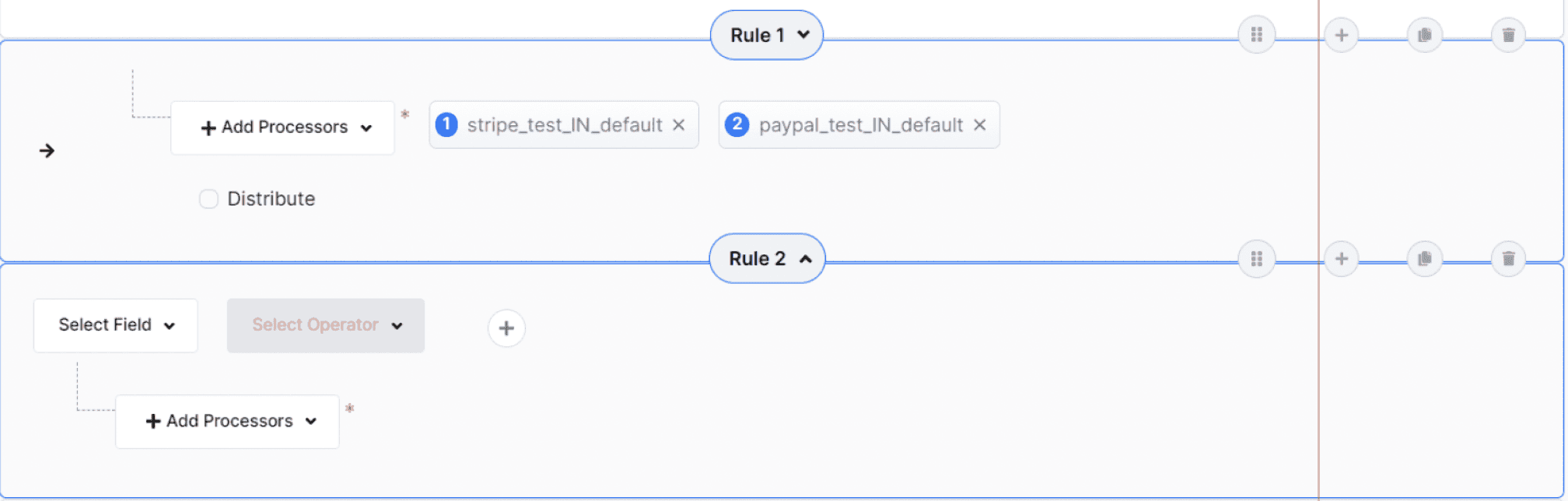
Fig. 3.1. Complexity in existing competitor flows
Fig. 3.1. Complexity in existing competitor flows
Finalising the ‘Rule Workspace” look
Each design pass uncovered something new. Slowly but surely, clarity emerged:
and a user guide for easy understanding......
and a user guide for easy understanding......
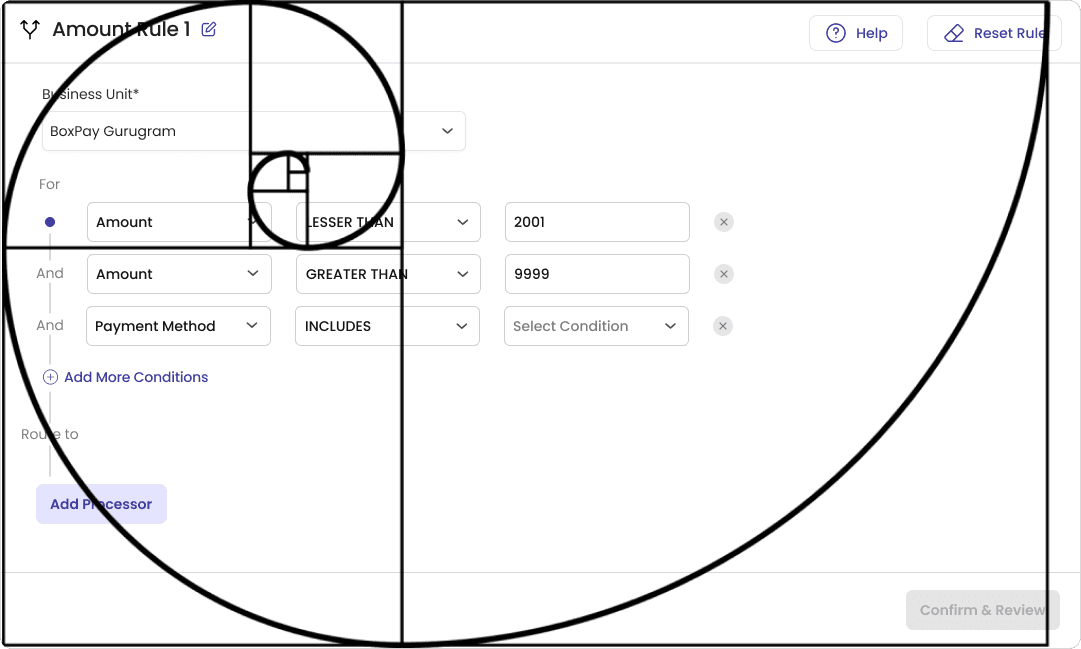
🌀 Spacing System & Visual Balance
An 8px spacing grid keeps high frequency fields like Business Unit, Amount, and Payment Method tightly grouped for fast scanning, while key decision points like Add Condition and Confirm & Review get extra room to signal they're distinct steps, not just more inputs.
Interestingly, when I overlaid a Fibonacci spiral on the final layout afterward, it roughly traced this same hierarchy — tighter inner fields opening outward toward Confirm & Review. Not something I designed toward, but a neat confirmation the spacing logic held together visually.
🌀 Spacing System & Visual Balance
An 8px spacing grid keeps high frequency fields like Business Unit, Amount, and Payment Method tightly grouped for fast scanning, while key decision points like Add Condition and Confirm & Review get extra room to signal they're distinct steps, not just more inputs.
Interestingly, when I overlaid a Fibonacci spiral on the final layout afterward, it roughly traced this same hierarchy — tighter inner fields opening outward toward Confirm & Review. Not something I designed toward, but a neat confirmation the spacing logic held together visually.
One Smart Condition
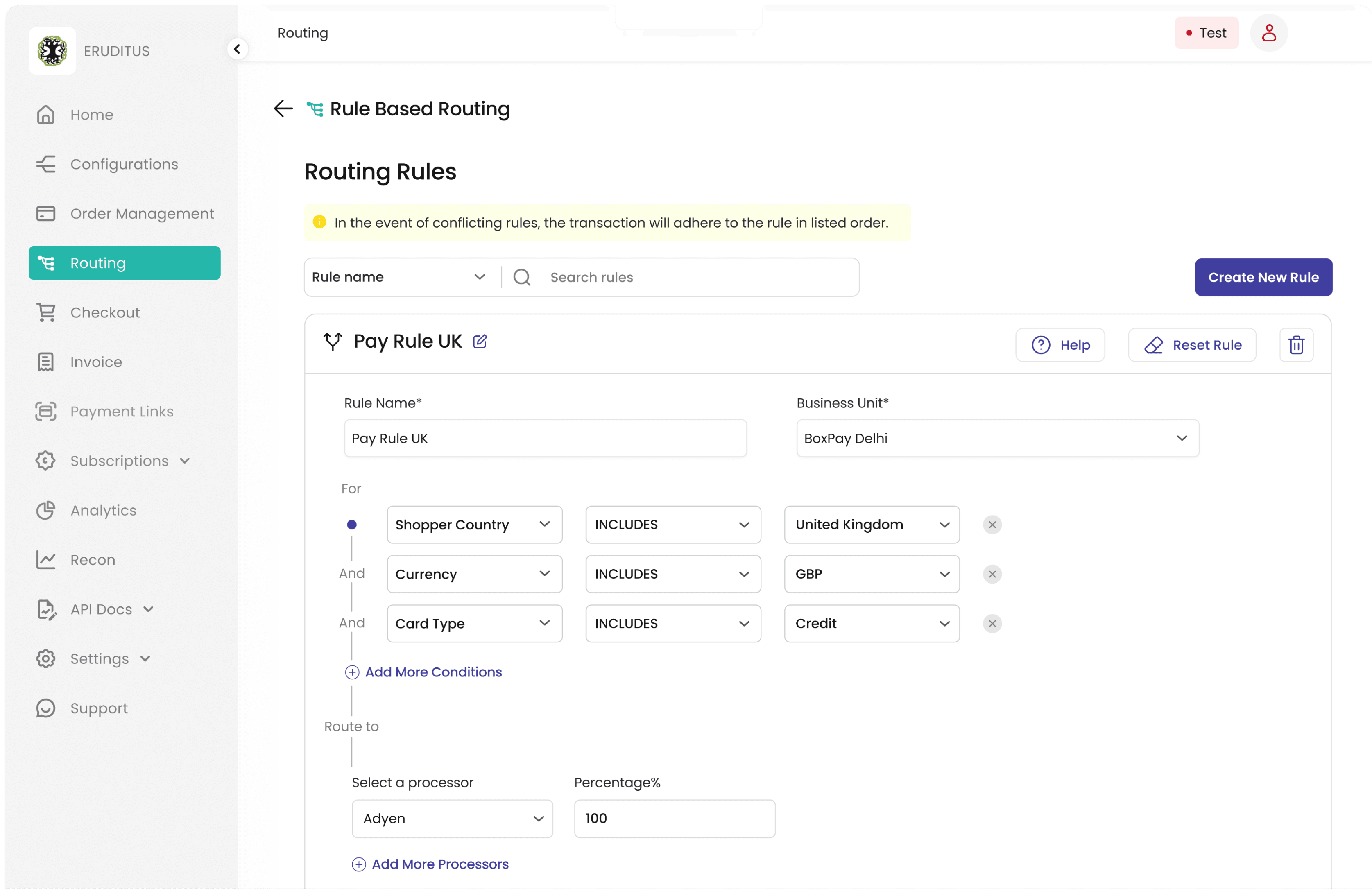
The original routing design required merchants to input all four fields. This was rigid. So, I redesigned it with - One smart condition field, allowing users to define only what mattered.
Users have the freedom to create rules in whichever order suits their needs.
Applying Progressive Disclosure & Law of Proximity
To reduce cognitive load, I used progressive disclosure, showing one field at a time, revealing the next based on user input.
Related conditions were grouped horizontally to visually signal their connection.
Choose Multiple Processors With Ease
Users can now effortlessly select multiple partnered payment gateways and distribute daily transaction volumes with ease.
Key aspects of the redesigned Rule Workspace:
Video. 1. Prototype of the Rule Workspace Design
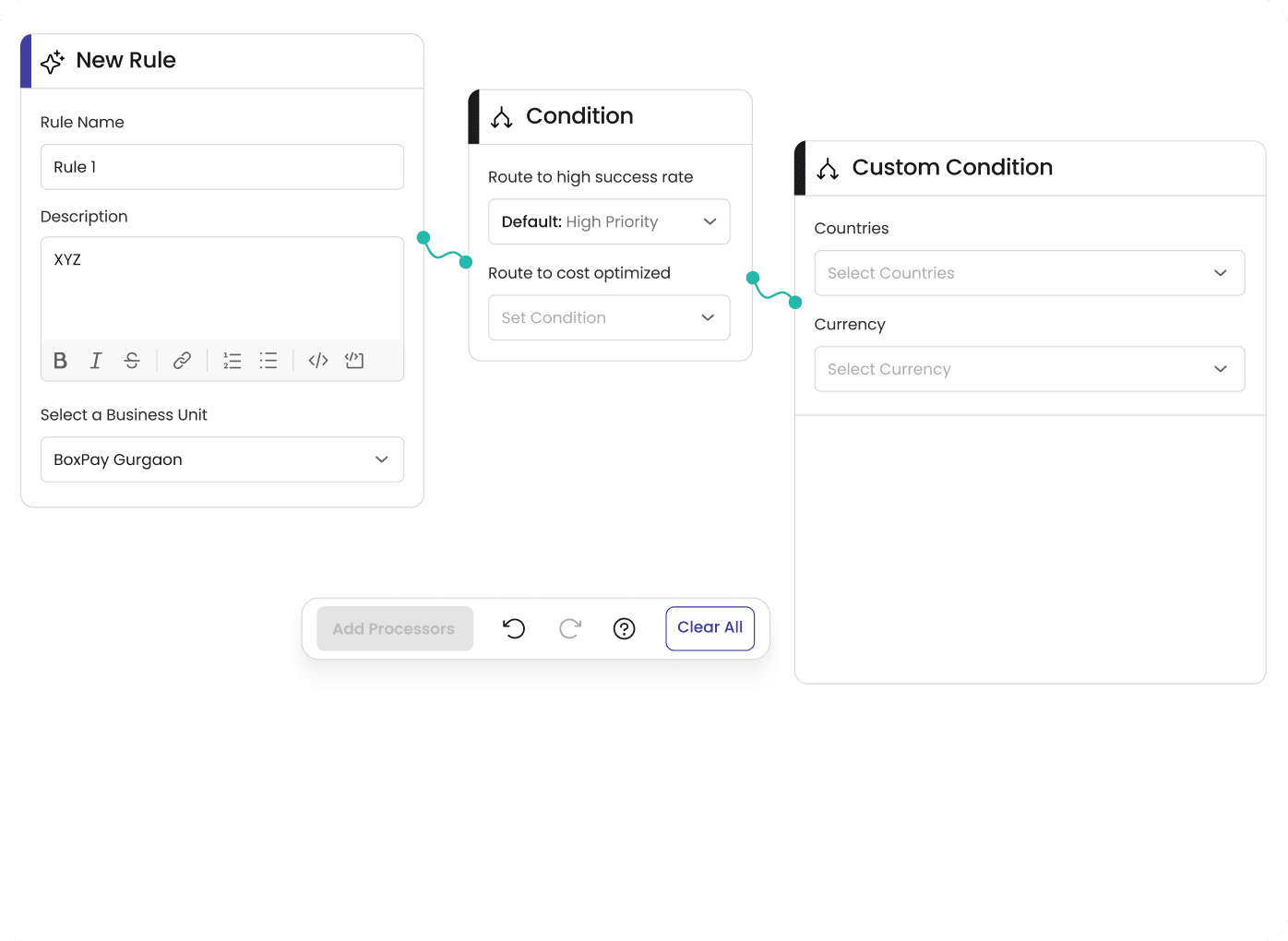
"Nope to horizontal scrolls." Users preferred vertical flow for better readability.

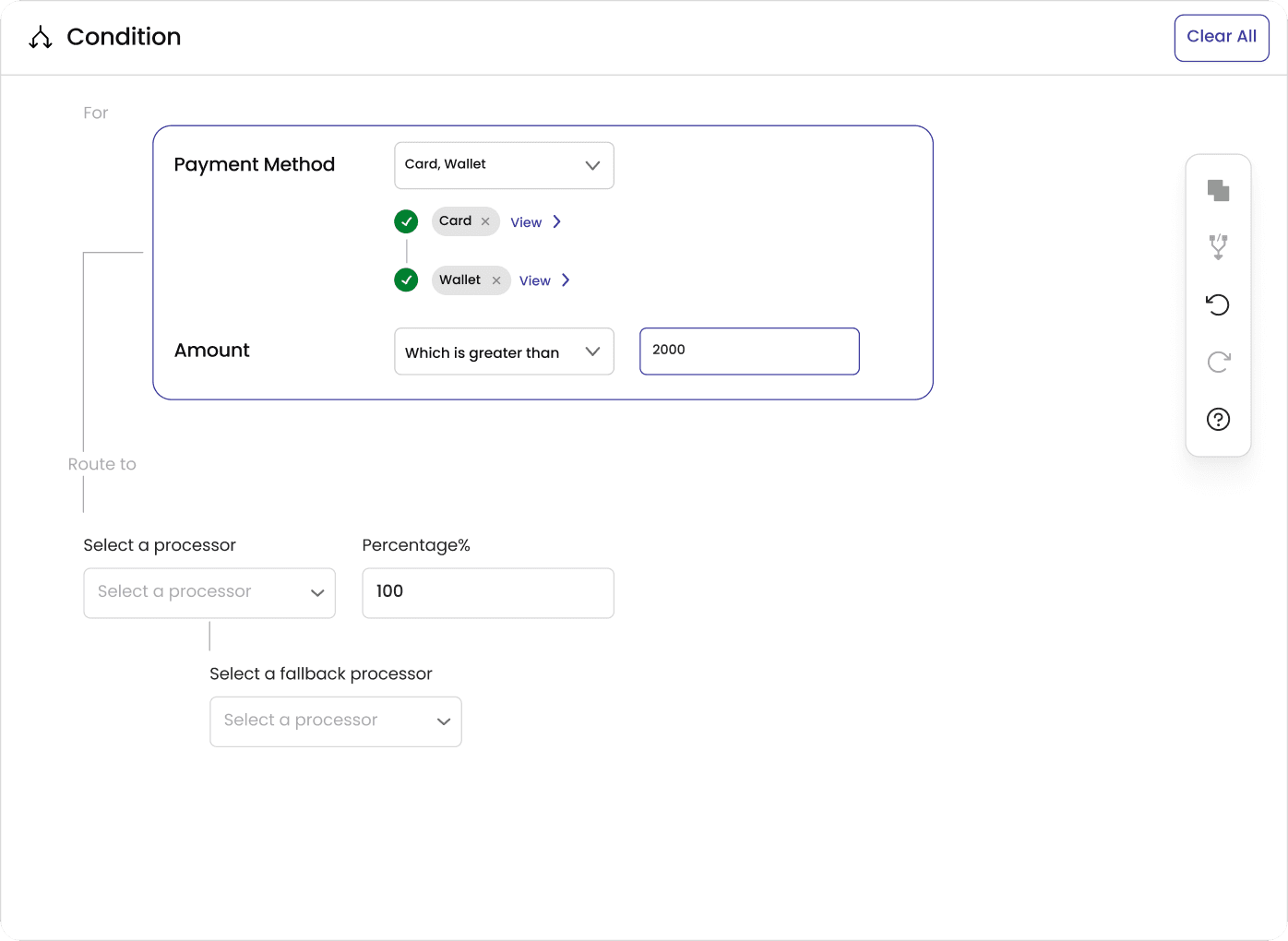
"Big blocks, big problems." The single-rule idea didn’t scale, mentally or practically. Breaking the logic into separate rules made it more approachable.
TAKE 2
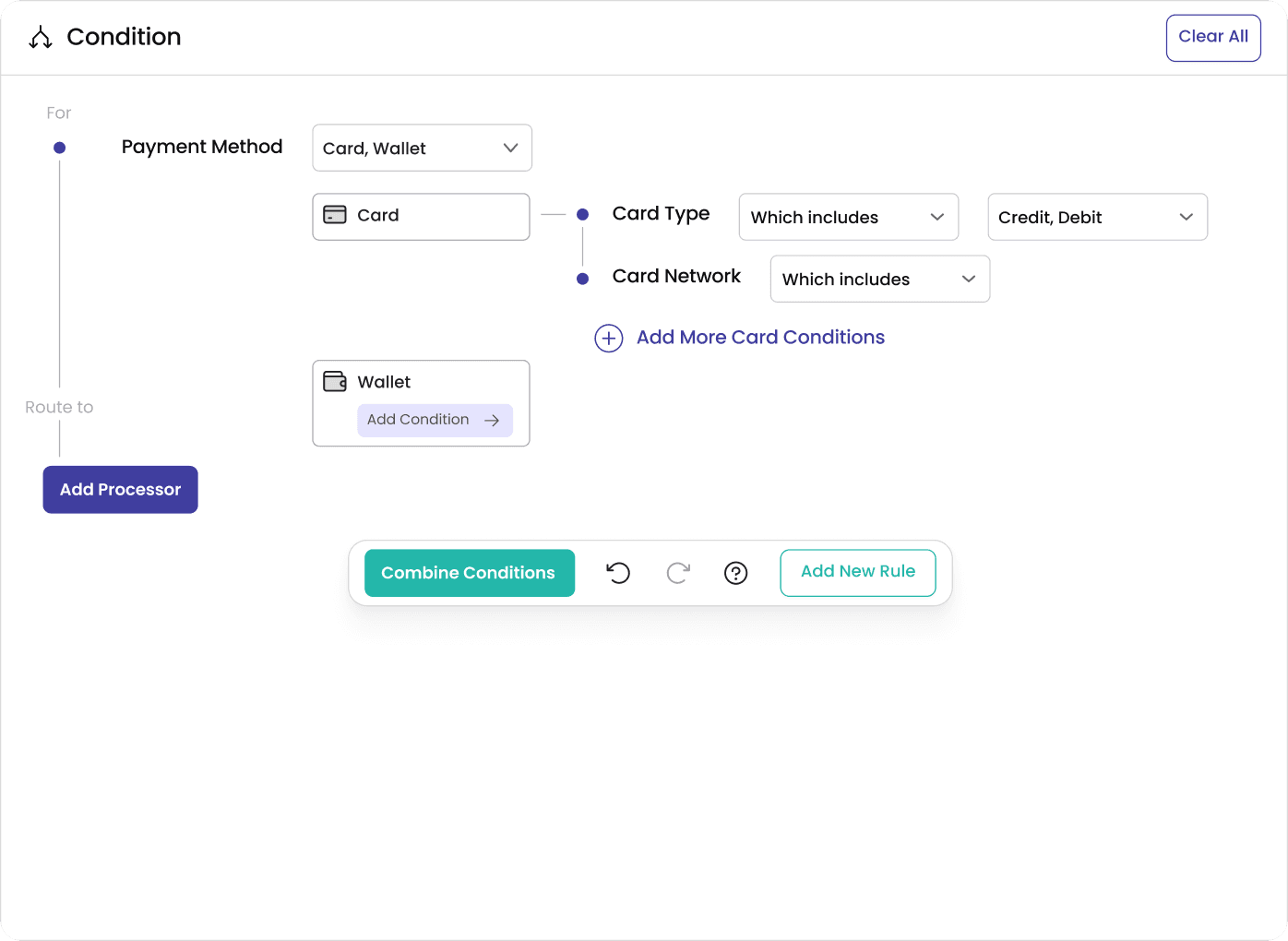
"Stand out, but stay aligned." The new design needed to feel fresh without straying from the design language or alienating existing users.

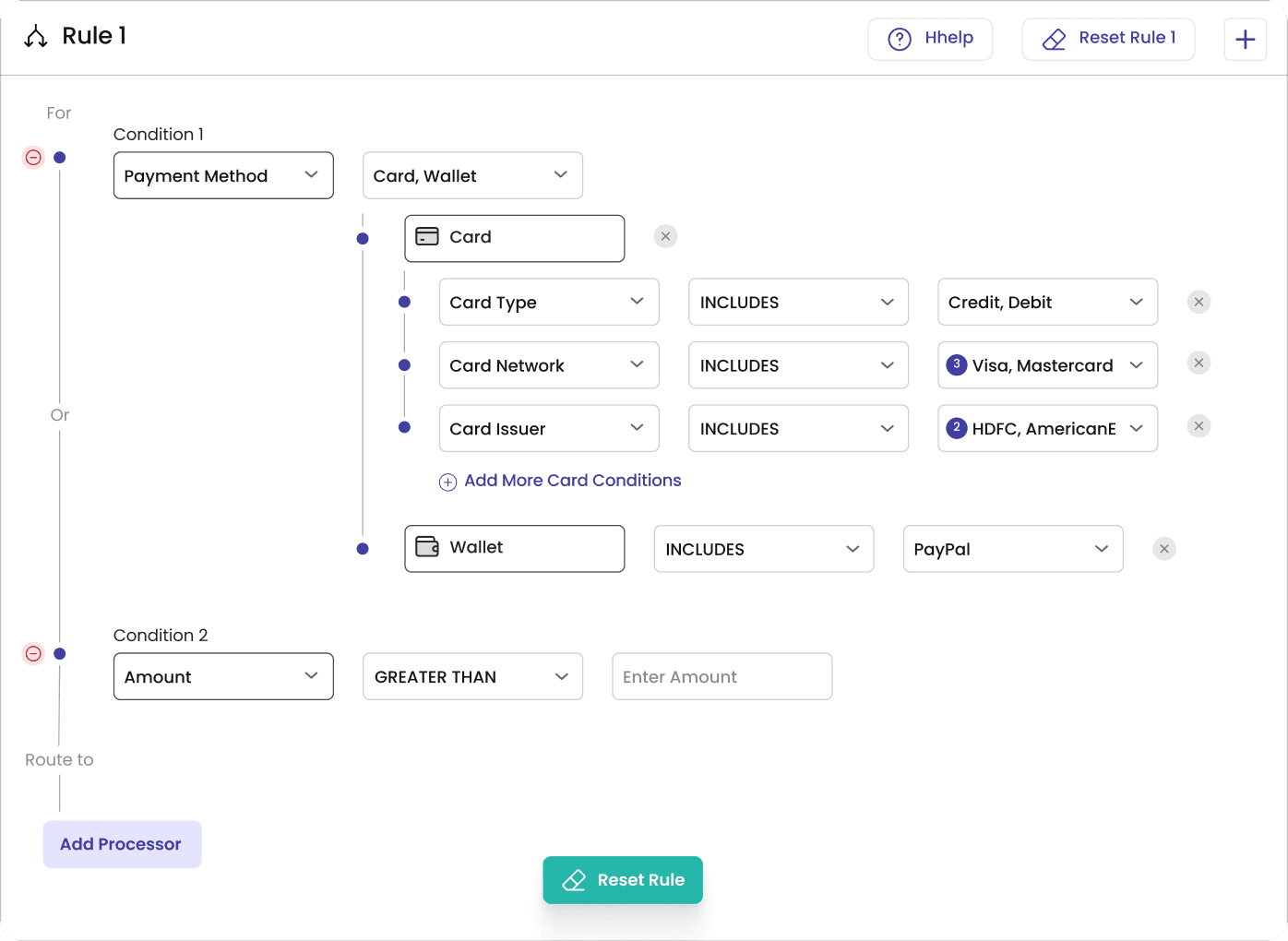
"OR is out." To avoid logic confusion, we stuck with just AND/UNION operations.

Video. 1. Prototype of the Rule Workspace Design
"Nope to horizontal scrolls." Users preferred vertical flow for better readability.

"Big blocks, big problems." The single-rule idea didn’t scale, mentally or practically. Breaking the logic into separate rules made it more approachable.
TAKE 2
"Stand out, but stay aligned." The new design needed to feel fresh without straying from the design language or alienating existing users.

"OR is out." To avoid logic confusion, we stuck with just AND/UNION operations.

One Smart Condition
The original routing design required merchants to input all four fields. This was rigid. So, I redesigned it with, one smart condition field, allowing users to define only what mattered.
Users have the freedom to create rules in whichever order suits their needs.
Applying Progressive Disclosure & Law of Proximity
To reduce cognitive load, I used progressive disclosure, showing one field at a time, revealing the next based on user input.
Related conditions were grouped horizontally to visually signal their connection.
Choose Multiple Processors With Ease
Users can now effortlessly select multiple partnered payment gateways and distribute daily transaction volumes with ease.
Video. 1. Prototype of the Rule Workspace Design
After getting buy-in from the PM, this design was tested internally with sales team members (non-technical users). Feedback was overwhelmingly positive. Users found the concept intuitive, and devs confirmed most ideas were implementable with minimal overhead. It was time for a product workshop with the team and management.
Users vs. Design: Round One
Once the Rule Builder Workspace took shape, the Chief Product Officer (CPO) brought up a thoughtful question during the product workshop:
“Do you think this setup can handle all the edge cases our merchants deal with?”
Back for Round Two: The Plot Thickens
Back for Round Two: The Plot Thickens
This led to a collaborative effort between the CPO and PM to list out 13 real-world use cases, including complex scenarios like:
▫️ BIN-specific card routing
▫️ Discounts based on network type or issuing bank
▫️ Multi-currency flows with varied payment methods
▫️ Region-specific fallback handling
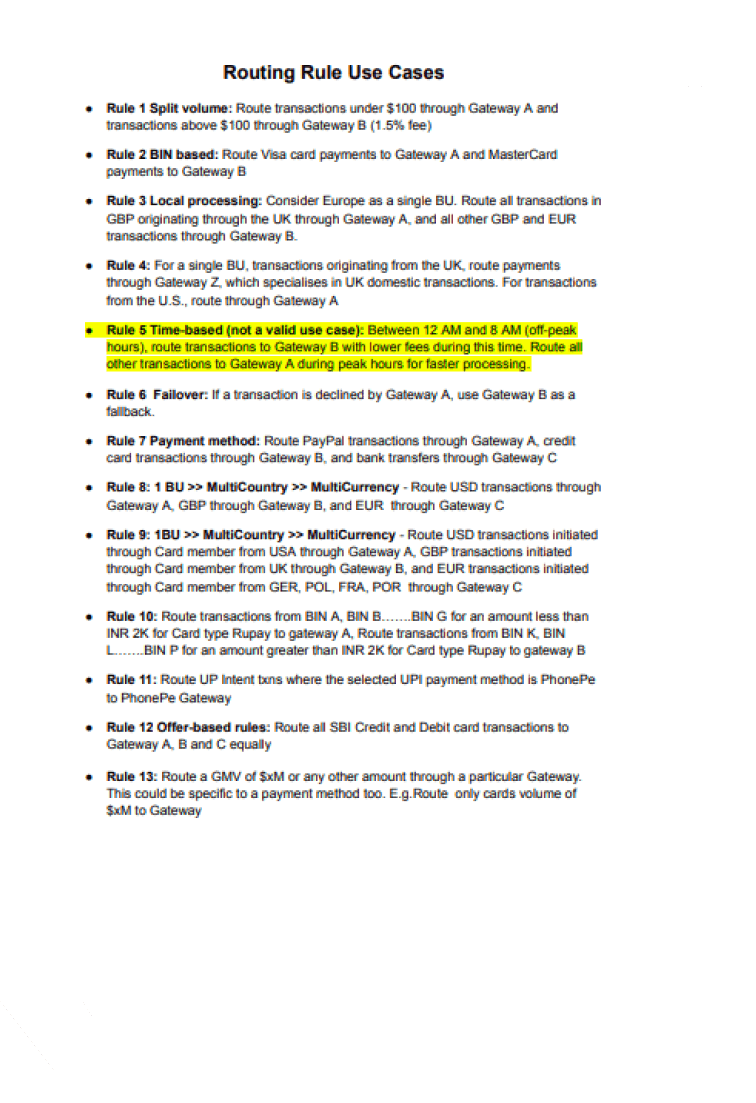
Fig. 4. Listed 13 real-world use cases
Fig. 4. Listed 13 real-world use cases
Fig. 4. Listed 13 real-world use cases
Each case was run through the prototype to ensure the design could support them seamlessly. A few edge interactions prompted quick design refinements, but overall, the workspace held up well and remained intuitive.
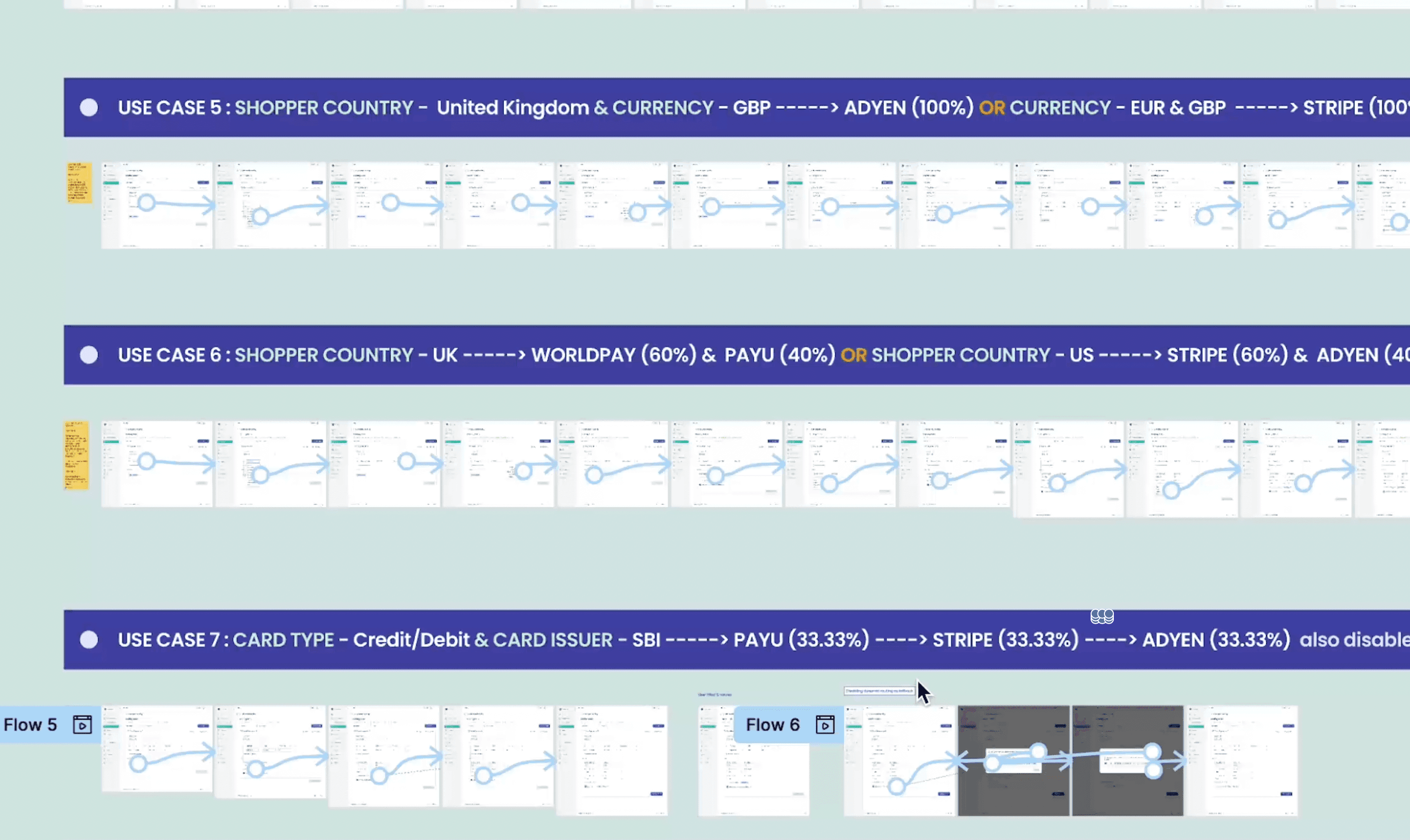
Scavenger Hunt
Meanwhile, I ran usability tests with non-technical team members using a method known as a Scavenger Hunt - a practical way to observe whether users could complete key tasks independently. Each of the 13 use cases was framed as a goal-based task, and users were asked to execute them using the interface. The aim was to test how quickly and naturally users could:
1️⃣ Recognise the correct entry points
2️⃣ Understand the rule-building flow
3️⃣ Complete each action without confusion
From the test, one recurring hiccup stood out: users struggled to identify the inline field meant for naming a rule.
Scavenger Hunt
Meanwhile, I ran usability tests with non-technical team members using a method known as a Scavenger Hunt, a practical way to observe whether users could complete key tasks independently. Each of the 13 use cases was framed as a goal-based task, and users were asked to execute them using the interface. The aim was to test how quickly and naturally users could:
1️⃣ Recognise the correct entry points
2️⃣ Understand the rule-building flow
3️⃣ Complete each action without confusion
From the test, one recurring hiccup stood out: users struggled to identify the inline field meant for naming a rule.
After syncing with the dev team, we made the field more prominent, re-tested it, and saw immediate improvement in feedback. I then updated the final Figma files to reflect the fix.
After syncing with the dev team, we made the field more prominent, re-tested it, and saw immediate improvement in feedback. I then updated the final Figma files to reflect the fix.
These iterative checks ensured functional completeness and a smooth and accessible user experience.
BEFORE
Rule Based Routing
Routing Rules
In the event of conflicting rules, the transaction will adhere to the rule in listed order.
Rule name
Search rules
Create New Rule
Enter Rule Name
Help
Reset Rule
For
Route to
Add Processor
Select Field
Add More Conditions
Business Unit*
Select Business Unit
Confirm & Review
Routing
Test
© 2024 BoxPay. All right reserved
Terms Privacy
Home
Configurations
Order Management
Routing
Checkout
Invoice
Payment Links
Subscriptions
Analytics
Recon
API Docs
Settings
Support

ERUDITUS
Fig. 5.1. Inline field creating friction in task completion
AFTER
Fig. 5.2. The solution – separating the name input and mirroring it in the header
BEFORE
Rule Based Routing
Routing Rules
In the event of conflicting rules, the transaction will adhere to the rule in listed order.
Rule name
Search rules
Create New Rule
Enter Rule Name
Help
Reset Rule
For
Route to
Add Processor
Select Field
Add More Conditions
Business Unit*
Select Business Unit
Confirm & Review
Routing
Test
© 2024 BoxPay. All right reserved
Terms Privacy
Home
Configurations
Order Management
Routing
Checkout
Invoice
Payment Links
Subscriptions
Analytics
Recon
API Docs
Settings
Support
ERUDITUS
Fig. 5.1. Inline field creating friction in task completion
AFTER
Fig. 5.2. The solution - separating the name input and mirroring it in the header
Final workflow decisions
With the Rule Workspace ready, the next big piece was shaping the user journey. Like many of our competitors, I initially considered the standard 3-step flow:
✏️ Add a rule name and description
🧩 Define logic and assign a payment gateway
💾 Review and save the rule in a separate table
Rather than the standard three-step flow of name, logic, and then review, I thought of merging everything into one continuous single-screen experience.
When a user creates a new rule, the workspace appears right in place. Once completed, it neatly folds into a compact card, stacking vertically, much like Gmail threads, allowing users to stay on the page. Want to add another? Just hit “Add New Rule”, and a fresh workspace drops right below the last.
Each rule minimises into a quick snapshot with an expandable chevron, making it easy to scan, edit, or revisit. No tab-hopping, no fragmented views - just one continuous, scrollable space that keeps everything tidy, intuitive, and in context.
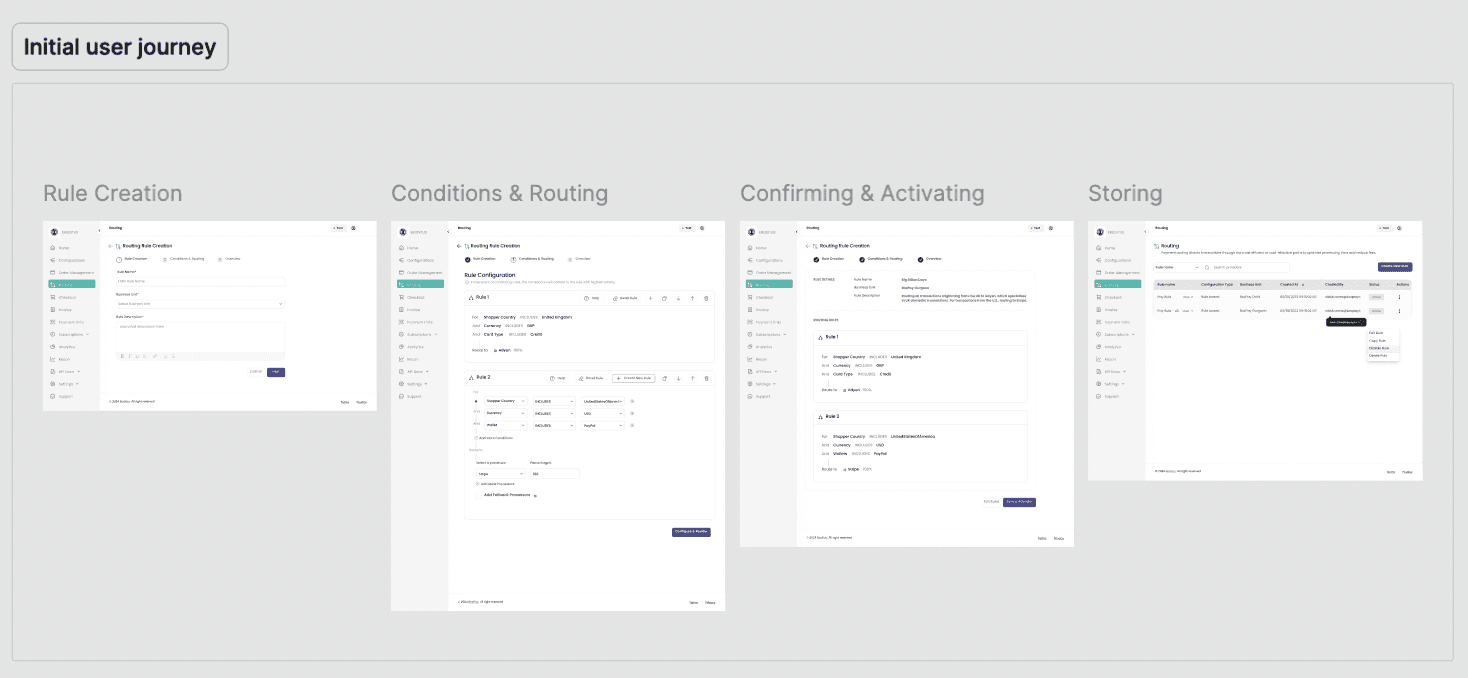
Fig. 6.1. Initial approach – generic user flow found in most competitor products
💡💡💡
After spending a few days wrestling with how to merge the entire flow into a single screen, inspiration struck most unexpectedly, while sending an email. As I typed away in Gmail, I noticed how the compose window sits right within the inbox and how every new email simply stacks on top of the last, creating a neat, scrollable list. No separate screens, no back-and-forth.
That’s when it clicked - what if routing rules worked the same way?

Inspiration from Gmail’s smart compose
Some additional features locked in:
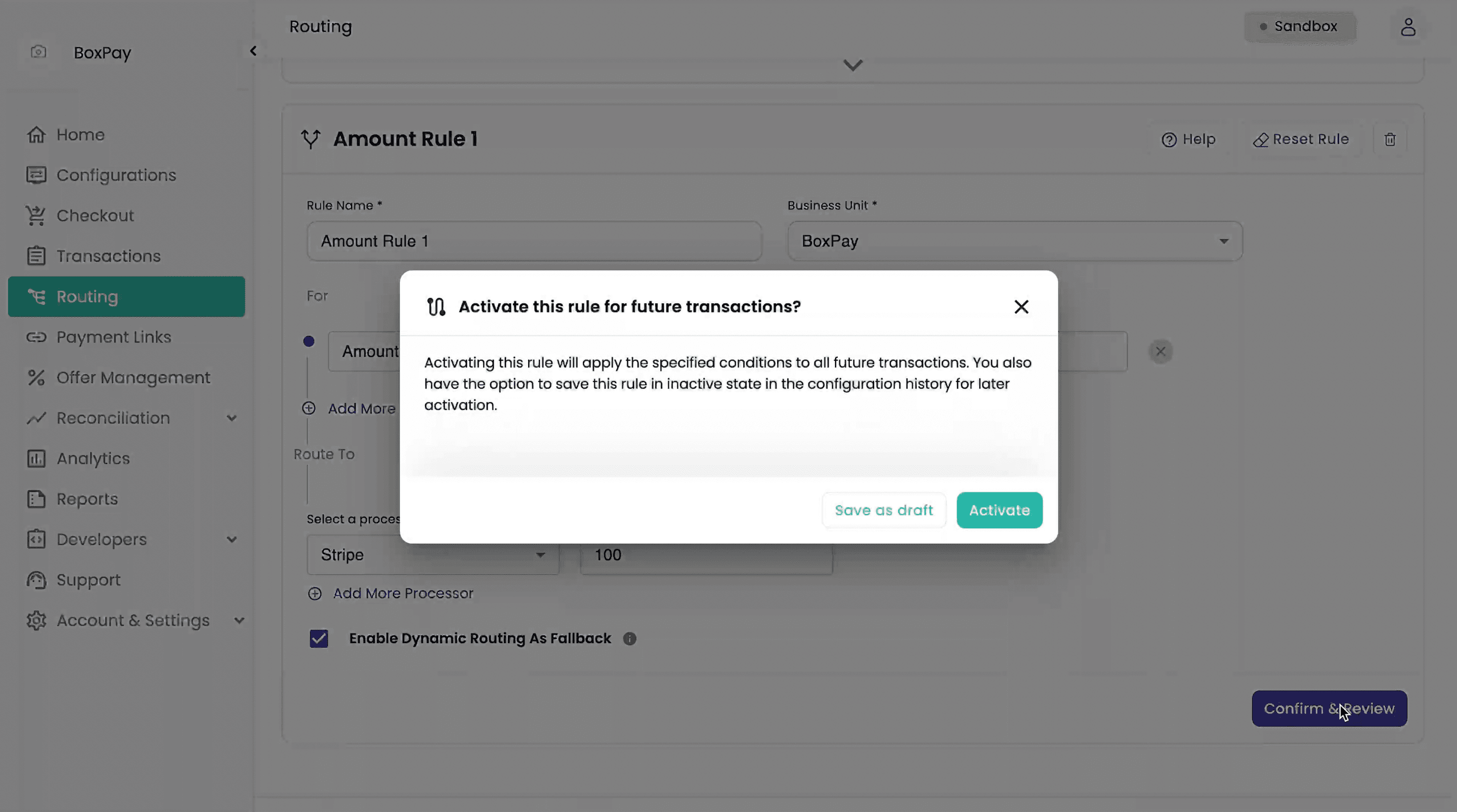
Saving or Activating
Rules can be activated or saved as drafts, with status tags for easy tracking and later edits.
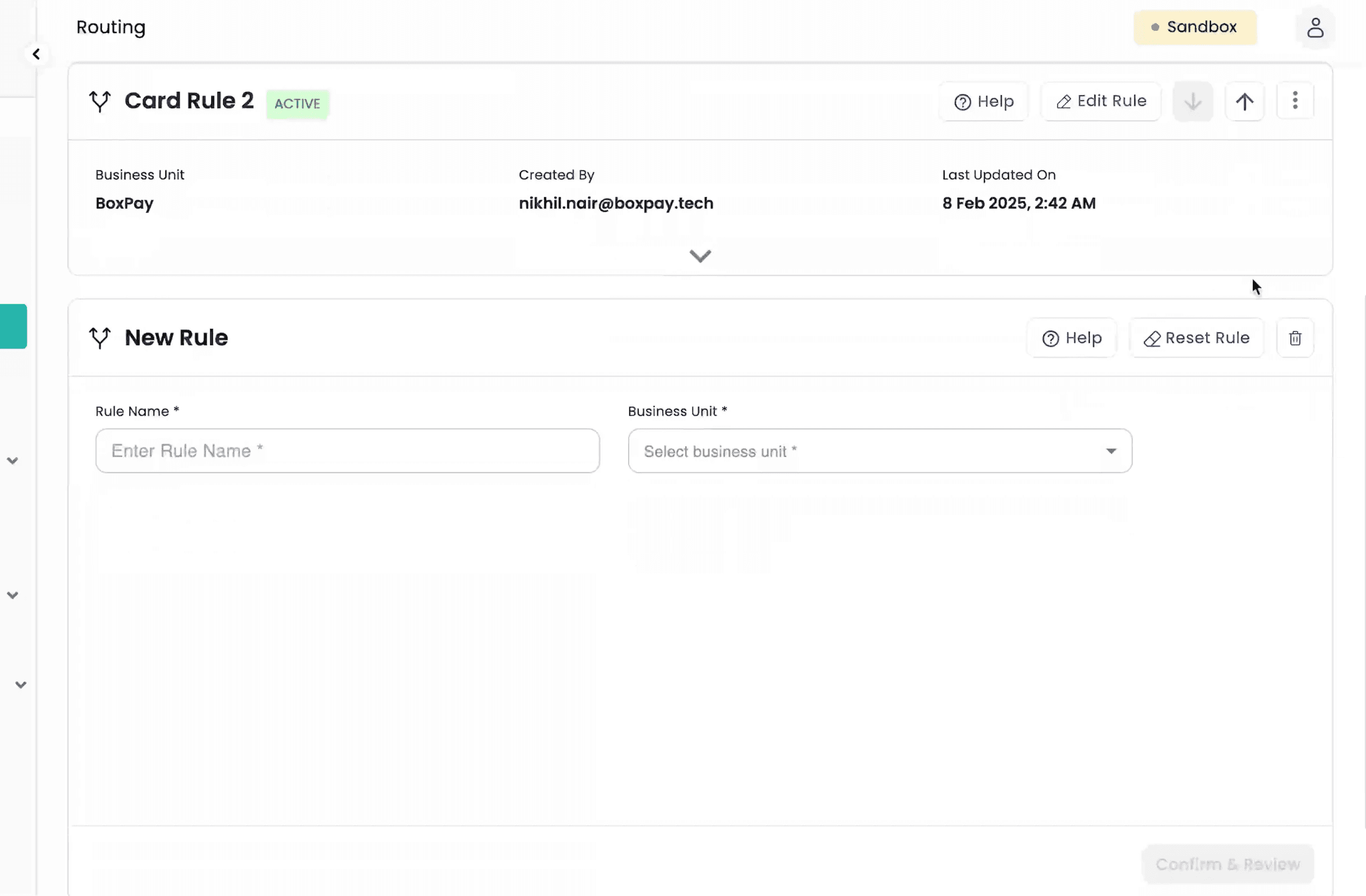
Create New Rule
New rules stack below the old ones, Gmail-style, no need to switch pages.
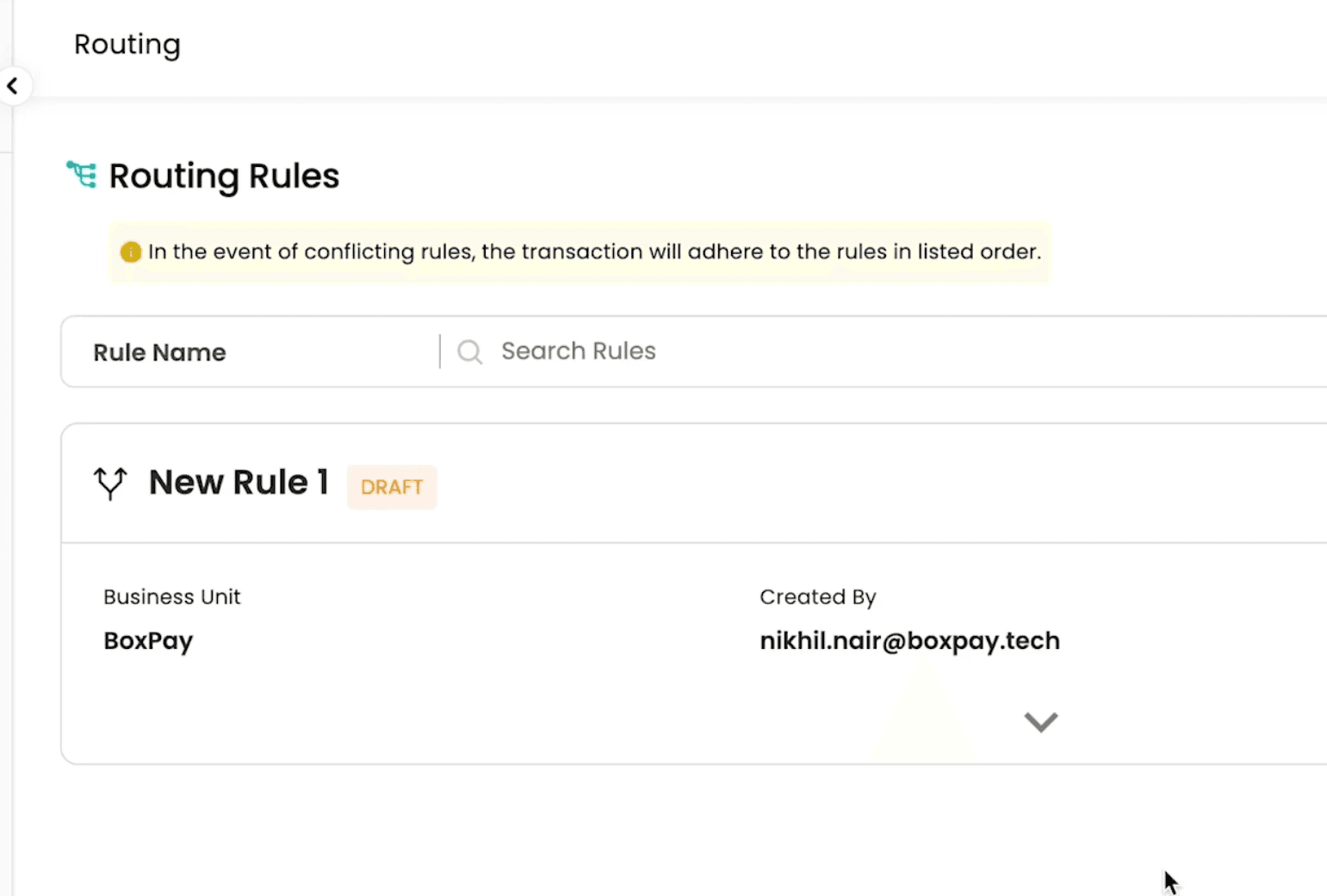
Drafts That Wait for You
Not sure yet? Just leave it. Your progress is saved as a draft so you can return and complete it anytime.
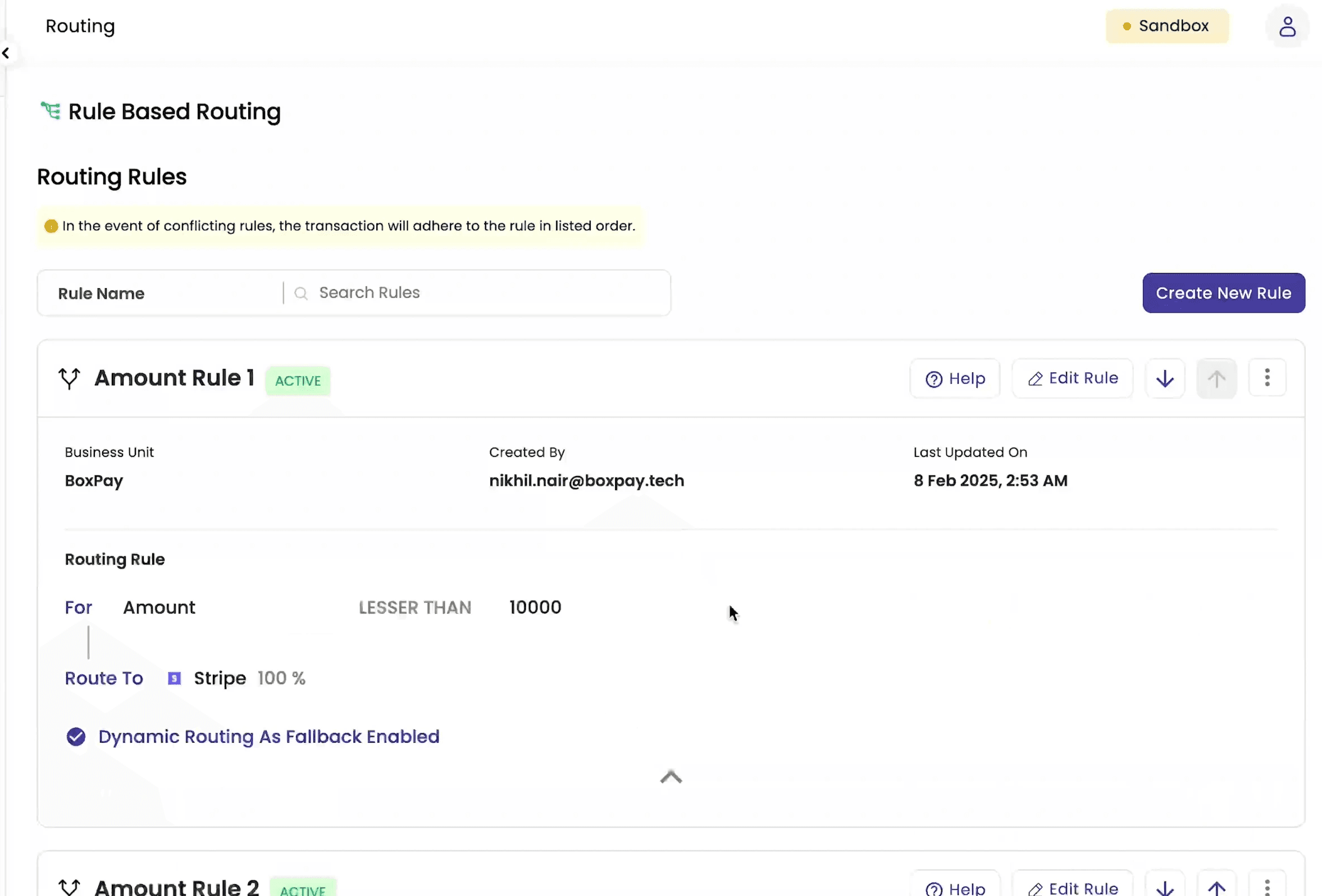
Full View or Quick Glance — Your Choice
Expand to view rule details, collapse to keep things clean and focused.
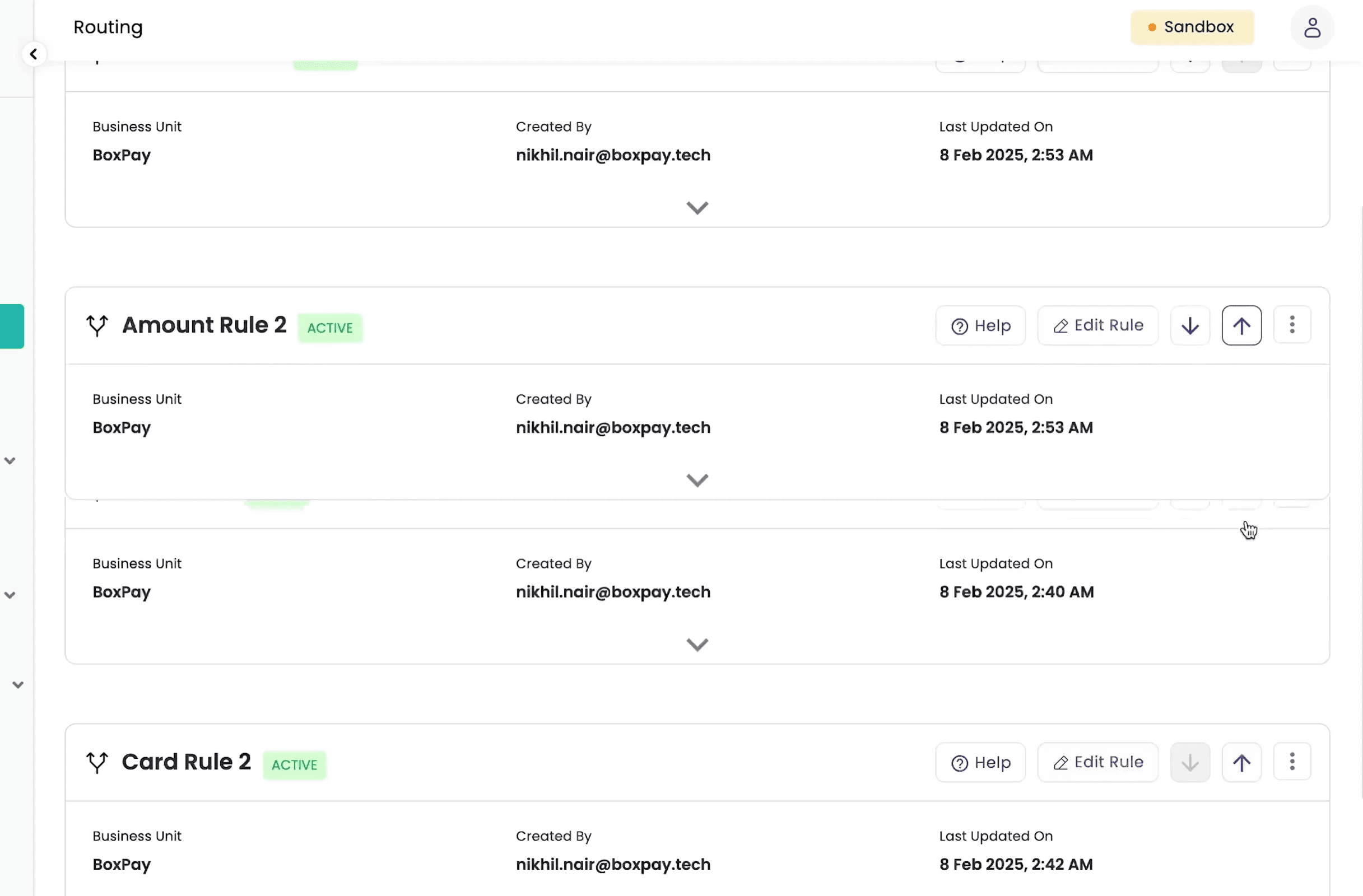
Change Priority at Will
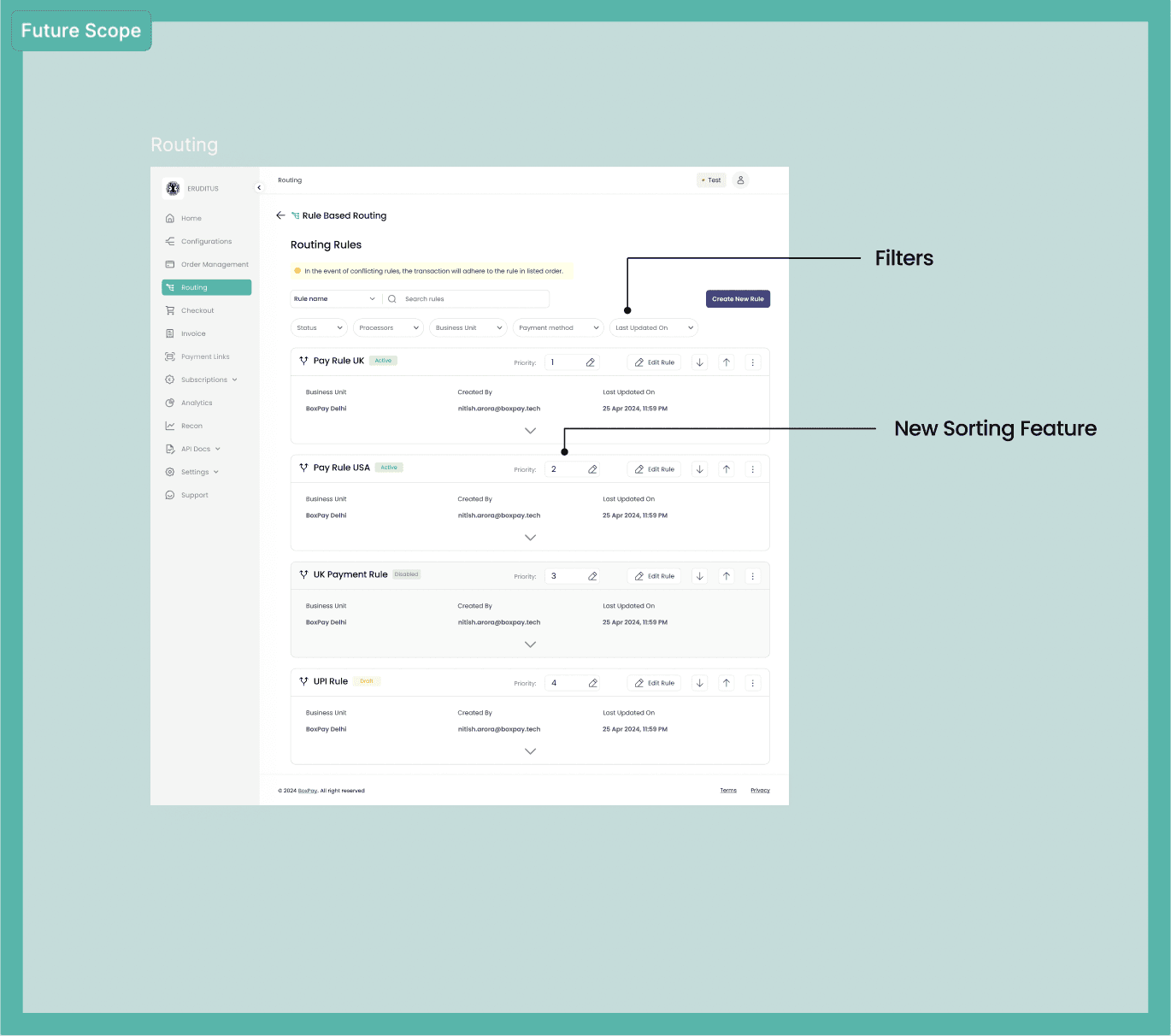
Sorting & priority setting made simple with up/down arrows (P.S. drag & drop felt clunky for large cards).
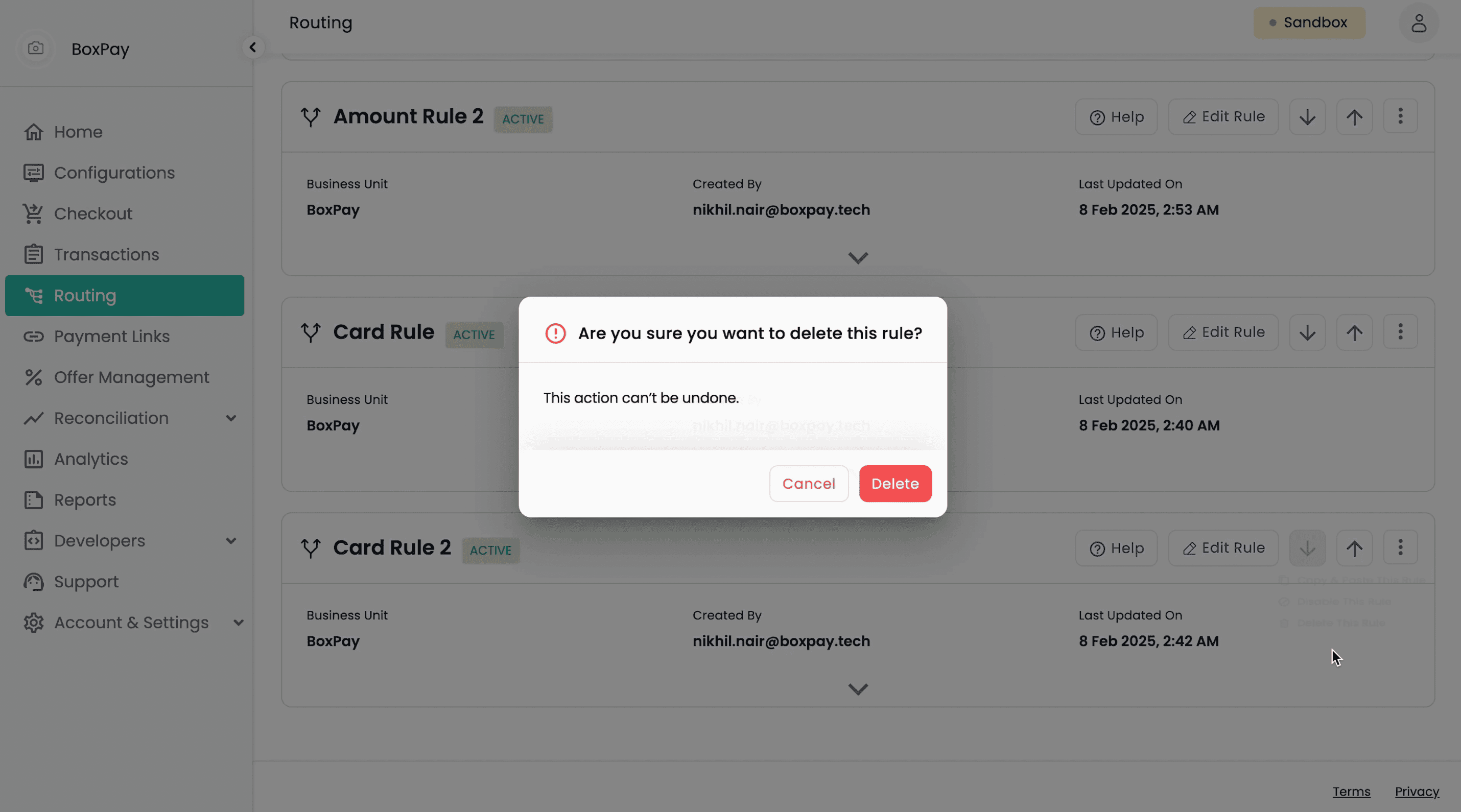
Copy, Delete, Disable or Activate
Everything you need to build a rule is accessible in a single click.
By keeping the entire journey on one screen, users could:
▫️ Name the rule
▫️ Define logic
▫️ Choose gateways
▫️ Save or activate - all in one place
This single-screen approach cut down the creation time significantly and reduced navigation friction.
Final workflow decisions
Final workflow decisions
With the Rule Workspace ready, the next big piece was shaping the user journey. Like many of our competitors, I initially considered the standard 3-step flow:
✏️ Add a rule name and description
🧩 Define logic and assign a payment gateway
💾 Review and save the rule in a separate table
Rather than the standard three-step flow of name, logic, and then review, I thought of merging everything into one continuous single-screen experience.
When a user creates a new rule, the workspace appears right in place. Once completed, it neatly folds into a compact card, stacking vertically, much like Gmail threads, allowing users to stay on the page. Want to add another? Just hit “Add New Rule”, and a fresh workspace drops right below the last.
Each rule minimises into a quick snapshot with an expandable chevron, making it easy to scan, edit, or revisit. No tab-hopping, no fragmented views, just one continuous, scrollable space that keeps everything tidy, intuitive, and in context.
Fig. 6.1. Initial approach – generic user flow found in most competitor products
💡💡💡
After spending a few days wrestling with how to merge the entire flow into a single screen, inspiration struck most unexpectedly while sending an email. As I typed away in Gmail, I noticed how the compose window sits right within the inbox and how every new email simply stacks on top of the last, creating a neat, scrollable list. No separate screens, no back-and-forth.
That’s when it clicked: What if routing rules worked the same way?
Inspiration from Gmail’s smart compose
💡💡💡
After spending a few days wrestling with how to merge the entire flow into a single screen, inspiration struck most unexpectedly while sending an email. As I typed away in Gmail, I noticed how the compose window sits right within the inbox and how every new email simply stacks on top of the last, creating a neat, scrollable list. No separate screens, no back-and-forth.
That’s when it clicked: What if routing rules worked the same way?
Inspiration from Gmail’s smart compose
Some additional features locked in:
Saving or Activating
Rules can be activated or saved as drafts, with status tags for easy tracking and later edits.
Create New Rule
New rules stack below the old ones, Gmail-style, no need to switch pages.
Drafts That Wait for You
Not sure yet? Just leave it. Your progress is saved as a draft so you can return and complete it anytime.
Full View or Quick Glance — Your Choice
Expand to view rule details, collapse to keep things clean and focused.
Change Priority at Will
Sorting & priority setting made simple with up/down arrows (P.S. drag & drop felt clunky for large cards).
Copy, Delete, Disable or Activate
Everything you need to build a rule is accessible in a single click.
By keeping the entire journey on one screen, users could:
▫️ Name the rule
▫️ Define logic
▫️ Choose gateways
▫️ Save or activate - all in one place
This single-screen approach cut down the creation time significantly and reduced navigation friction.
Once the design was locked in, it moved into development. A phase that wrapped up smoothly within three weeks.
I collaborated closely with the front-end and QA teams to ensure the implementation stayed true to the design, down to the last pixel. During this phase, I flagged a few minor UI inconsistencies and bugs, which were quickly resolved during dev handoff.
I collaborated closely with the front-end and QA teams to ensure the implementation stayed true to the design, down to the last pixel. During this phase, I flagged a few minor UI inconsistencies and bugs, which were quickly resolved during dev handoff.
With everything polished, the feature was deployed to the sandbox environment, ready for real-world testing and feedback.
We then ran a final round of user testing, this time with internal teams, a few merchants, and even some friends and family. The response was overwhelmingly positive - users genuinely enjoyed the fresh, intuitive approach and expressed delight in how effortless the feature felt.
We then ran a final round of user testing, this time with internal teams, a few merchants, and even some friends and family. The response was overwhelmingly positive, users genuinely enjoyed the fresh, intuitive approach and expressed delight in how effortless the feature felt.
Development and final round of testing
Even before full-scale launch, early indicators pointed to strong adoption and usability wins:
Even before full-scale launch, early indicators pointed to strong adoption and usability wins:
✅ 13/13 use cases passed using the new interface (including complex routing conditions with BIN, network, and card-type logic)
✅ 80% success rate in first-time usability tests with non-technical users. Supported advanced logic, yet stayed simple for all user types
✅ Consistent feedback from stakeholders: “Feels intuitive just like creating a Gmail filter.”
✅ Reduced steps from 3 to 1, saving time and reducing merchant drop-offs
✅ Final tweaks (like editable inline fields) added after testing - led to 100% clarity in the final round
✅ Presenting this feature to potential clients helped onboard 2 new merchants, bringing the total number of partners to 33.
Impact? Oh, It Made Some Noise!
The journey of building this feature came with a few unexpected (but valuable) lessons:
👉🏻 Inspiration doesn’t always strike in brainstorming sessions. Sometimes, it arrives in your inbox, mid-email and with time.
👉🏻 The KISS (Keep it Simple, Stupid) rule is gold. Not to try to build a spaceship when a bicycle will do to get started. Designing from simplicity gave me the clarity I needed to scale smarter.
👉🏻 People from different roles, sales, devs, friends outside tech, all brought in fresh perspectives. The more conversations I had, the sharper the design became.
While we kept the scope limited to a lean Version 1 to measure response and usability, we already had a few exciting enhancements on the radar:
• Filters - allowing users to search and sort through created rules by name, payment method, creation date, etc.
• Prioritisation Enhancements - giving users more granular control over rule order beyond manual stacking and tedious clicking of up and down arrows.
More to come, but we had to start somewhere - and starting with clarity felt like the right call.
Hindsight, Foresight, and All the Bright Sides